How LexHound Works
Upload your records, ask questions in plain English, and get answers cited to the source page, all under a signed Business Associate Agreement.
The LexHound Workflow: 5 Simple Steps
Upload Medical Records
Drag and drop medical records, discovery documents, expert reports, or any litigation files. LexHound accepts all formats:
- PDFs: Searchable or scanned (OCR automatically applied)
- Images: JPG, PNG, TIFF (from medical imaging CDs)
- Word/Excel: DOCX, XLSX (preserves formatting and metadata)
- Emails: MSG, EML files (preserves threading)
Security: All data encrypted in transit (TLS 1.3) and at rest (AES-256).
AI Analyzes Documents (Automatic)
While you grab coffee, LexHound's Deep Agent architecture processes your documents:
- OCR: Converts scanned images to searchable text
- Entity Extraction: Identifies providers, medications, procedures, dates
- Knowledge Graph: Maps relationships between entities across documents
- Chronology: Auto-generates timeline of all medical events
- Indexing: Creates triple-search index (keyword + vector + graph)
In the background: Processing runs in the background, and we email you when it's done.
Ask Questions in Plain English
No complex queries or Boolean operators. Ask questions the same way you'd ask a legal assistant:
"Create a timeline of the patient's treatment on January 15, 2024"
"Find contradictions between Dr. Smith's operative report and the nursing notes"
"Show me every time morphine was administered and the patient's pain level before and after"
"Which physicians documented care during the 24-hour critical period?"
Every answer: comes with exact page citations.
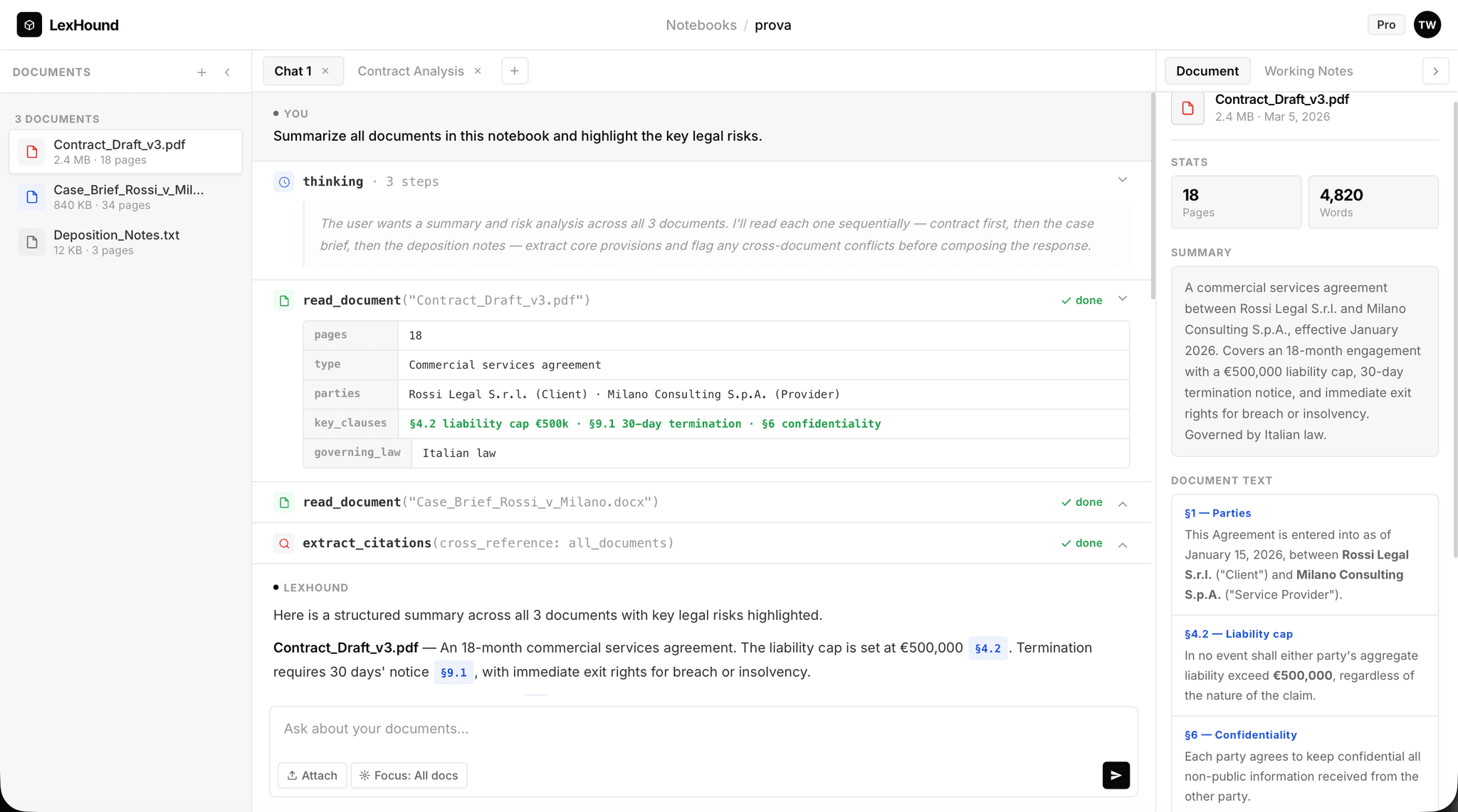
Review AI-Generated Insights
LexHound delivers answers with exact source citations:
- Direct Answer: Plain-language response to your question
- Source Citations: The page (or Bates number) behind every fact (click to view source)
- Timeline Tables: Chronological event sequences with timestamps
- Entity Lists: Providers, medications, procedures mentioned
- Contradictions: Flagged discrepancies between documents
Verifiable: Click any citation to view the source document with the exact passage highlighted.
Export to Your Workflow
Export LexHound's analysis to your existing tools:
- Chronologies, timelines, and analysis: Export to PDF or Word (DOCX), with citations
- Word documents: Deposition outlines and demand-letter drafts to edit in your own templates
- Chat History: Save the Q&A session and export it to PDF or Word
Unlimited Exports: No additional fees. Download as many times as needed.
What Makes LexHound Different
Built for PHI
Signed Business Associate Agreement (BAA) on every plan, and your data never leaves our Google Cloud environment. Consumer AI tools don't offer a BAA.
Graph RAG Technology
Advanced relational entity search finds connections across documents. Answers questions like "Which physicians ordered morphine?" that keyword and vector search alone can't.
Review Instead of Build
LexHound drafts chronologies and timelines and flags contradictions, each with a citation, so your team's hours go into checking and strategy, not assembly.
Example Workflow: Birth Injury Case
Traditional Approach (estimate)
- Day 1-3: Organize 15,000 pages chronologically (20 hours)
- Day 4-10: Create medical chronology manually (40 hours)
- Day 11-12: Review for documentation gaps (8 hours)
- Day 13-15: Find provider contradictions (15 hours)
- Day 16-20: Send to legal nurse consultant for review (30 hours @ $200/hr = $6,000)
Total: about 20 business days and 113 hours of work
LexHound Approach
- 1. Upload all 15,000 pages
- 2. LexHound processes them in the background and emails you when it's done
- 3. Ask for the chronology, the documentation gaps, and the contradictions between providers
- 4. The attorney verifies each finding against its cited source page
- 5. Export the chronology and analysis to Word or PDF
Your team's hours go into verification and strategy. $999 per seat per month, unlimited cases.
Security & HIPAA Compliance
Data Security
- AES-256 encryption at rest
- TLS 1.3 encryption in transit
- Case data handled under our HIPAA policies and BAA
- No AI training on your documents
HIPAA Compliance
- Signed Business Associate Agreement (BAA)
- Access controls and audit logs
- PHI encryption and breach notification
- Regular security risk assessments
- Employee HIPAA training
Using an AI tool without a BAA for records that contain PHI can expose your firm to HIPAA penalties, which are assessed per violation (HHS).